# OpenAI DevDay 2026: dots, GPT-6.1 Sol and the new Space
> OpenAI introduces agents that keep working, a more capable Sol and shared AI pages. What changes, what the API costs and what you can use now.
Published: 2026-09-29. Original source: [OpenAI · DevDay 2026 Recap](https://openai.com/index/devday-2026-recap/).
Cover: the announcement screen from [OpenAI’s official keynote](https://www.youtube.com/watch?v=Fls_onRviPM&t=3700s).
**OpenAI introduced dots, GPT-6.1 Sol and ChatGPT Space at DevDay 2026 on September 29.** The keynote covered agents that keep tasks moving, collaboration inside ChatGPT and updates for developers building applications.
The faces in [the teaser we explored yesterday](/en/guides/openai-devday-2026-teaser-20-launches/) now accompany a product announcement: [dots](https://x.com/OpenAI/status/2104984504133918973). The demos showed work being delegated and reviewed later. Some features are rolling out; others remain previews or are coming later.
## What are OpenAI dots?
[Dots](https://openai.com/index/introducing-dots/) use GPT-6 Astra, retain context and work on their own cloud computer. You can follow a task from ChatGPT, Slack or Teams. OpenAI positions them for ongoing responsibilities, such as checking information and preparing work for approval.
Your first dot is included in eligible plans, with a work allowance. Tasks it delegates to Codex or Work count toward their usual limits. **Review connected apps and approval rules before delegating.**
## GPT-6.1 Sol: API pricing and performance
OpenAI presents [GPT-6.1 Sol](https://x.com/OpenAI/status/2104986129686741046) as approaching Astra in its evaluations at lower token prices. That comparison depends on the task; testing it with our own materials is still ahead.
### Sol 6.1 benchmarks against Sol, Astra and Opus
Choose a benchmark and a reasoning level. Each bar shows the score; the figure below it is the average task cost in that evaluation. **Low, Medium, High, Xhigh and Max are reasoning settings, not subscription plans.**
Three comparisons help explain the results:
- **Code, High:** Sol 6.1 scores 75.22% on DeepSWE, compared with Astra’s 73.23%. Average task costs are US$0.65 and US$3.92, respectively.
- **Automation, Medium:** Sol 6.1 reaches 31.70%; Opus 5.5 with fallback models reaches 29.53%. Costs are US$0.19 and US$0.65 per task.
- **Science, Max:** Astra retains an advantage: 68.10% against Sol 6.1’s 57.02%. Sol costs US$5.47 per task; Astra costs US$23.80.
In these results, increasing reasoning does not always improve the score. A coding benchmark’s task cost also cannot be assumed for marketing work: tools, tokens and success criteria differ.
### What the API costs
US$ per million tokens
GPT-6.1 Sol
US$
Input
2.00
Cached input
0.10
Output
10.00
[Official pricing](https://openai.com/index/introducing-gpt-6-1-sol/). The model ID is `gpt-6.1-sol`. As a calculated example, 10,000 input tokens and 2,000 output tokens cost **US$0.04**, excluding tools and caching. A workflow with several calls accumulates usage.
## Space and Pages: review work with your team
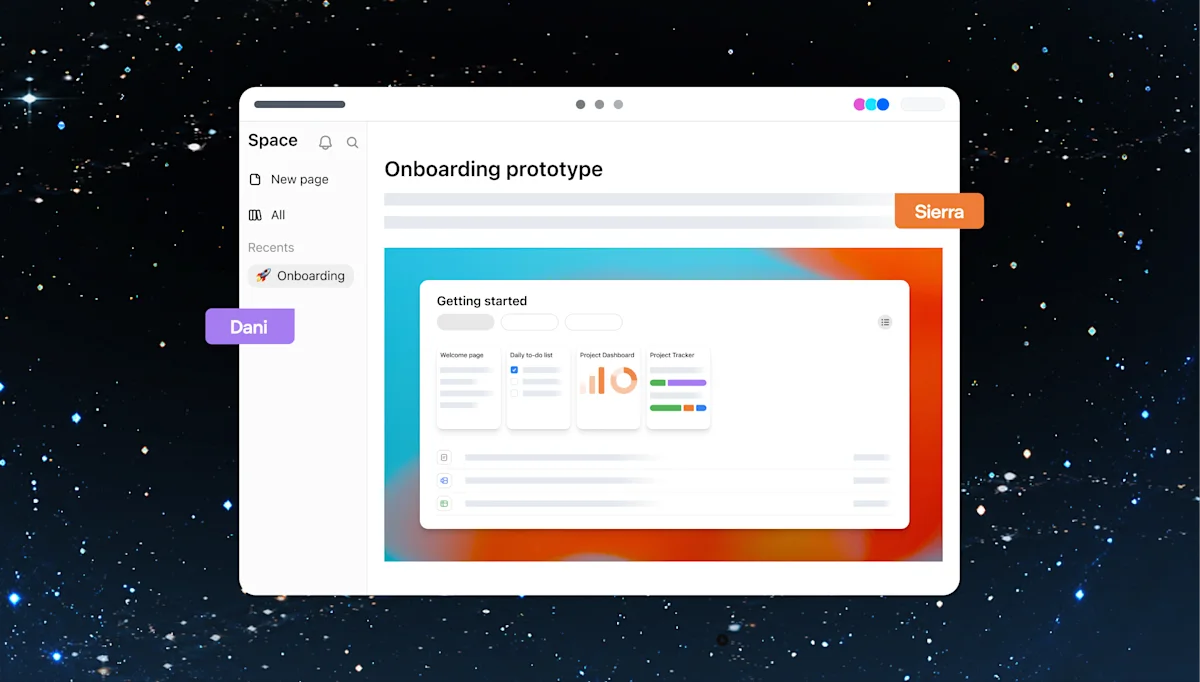
[ChatGPT Space](https://chatgpt.com/features/space/) supports shared pages, comments and requests for ChatGPT or a dot to make changes. It is available on Pro, Business and Enterprise. At launch, mobile supports reading and sharing; editing will follow.
Space interface published by OpenAI. Collaborative slides are still coming later.
For a content team, we suggest testing it with a real brief: gather references, request a proposal and review changes on the page. Check whether it preserves brand decisions and distinguishes facts from assumptions.
## Plugins and using your plan in other apps
[Plugin extensions](https://developers.openai.com/plugins/build/extensions) let developers add panels and editors inside ChatGPT. The keynote showed design and collaboration examples, including Adobe.
With [Sign in with ChatGPT](https://help.openai.com/en/articles/20001542-using-your-chatgpt-plan-in-other-apps-and-sites), Plus and Pro users can authorize participating apps to use their allowance. You can set a weekly limit per app. **The app may charge separately for its own services.**
## More keynote announcements
- **[Ultrafast](https://x.com/OpenAI/status/2104993966043320759):** OpenAI advertises up to 300 tokens per second in Codex. Generation speed alone does not measure how long a full task takes.
- **[Codex Security Cloud](https://x.com/OpenAI/status/2104987422308335828):** reviews repositories, investigates findings and prepares fixes in the cloud.
- **Decisions API:** a limited preview for choosing among predefined answers with Luna.
- **Agents API and Bedrock:** computer use and new options for running agents.
- **Pro 500, Private Intelligence and Marketplace:** additional usage capacity and enterprise updates.
The [official recap](https://openai.com/index/devday-2026-recap/) explains plans and availability. During the [keynote](https://www.youtube.com/watch?v=Fls_onRviPM), the voice demo ran into trouble and the presenter continued in the terminal. Before making a workflow part of daily work, test it on your own tasks.
For marketing, we would start with a small deliverable that is easy to check: a sourced report, a reviewed brief or a proposal with traceable changes. Our guide to [analyzing social media with real data](/en/guides/analyze-social-media-chatgpt-real-data/) explains how to check the figures for that test. Compatibility between the new dots and HeyMark still needs testing.
## Plan your next post in HeyMark.
Keep the idea, review the draft with your team, and see how it performed in the accounts you connected.
[Start free](https://app.heymark.ai) · [See how it works](https://heymark.ai/en/#product)
## Developer and agent resources
- [HeyMark MCP documentation](https://heymark.ai/en/mcp/)
- [llms.txt](https://heymark.ai/llms.txt)
- [Full site content for language models](https://heymark.ai/llms-full.txt)
- MCP protocol endpoint: `POST https://mcp.heymark.ai`
- OAuth protected-resource metadata: [/.well-known/oauth-protected-resource](https://mcp.heymark.ai/.well-known/oauth-protected-resource)
- MCP server card: [/server-card](https://mcp.heymark.ai/server-card)