Claude + HeyMark
In this guide, you'll learn how to connect your Instagram account to Claude through HeyMark and turn your own data into a growth strategy, without falling back on generic advice.
Connecting Claude to HeyMark avoids a fairly absurd task: copying posts and metrics one by one before you can analyze them. HeyMark already gathers that context. The connector lets Claude access it inside the chat.
How to connect Claude to HeyMark
You save the connection once. There is one small catch: having HeyMark in Settings does not mean it is active in every chat. That is why the final two steps verify access before the analysis begins.
- Open Claude
Go to claude.ai and sign in with the account you will use for the analysis. You should see the main Claude screen.
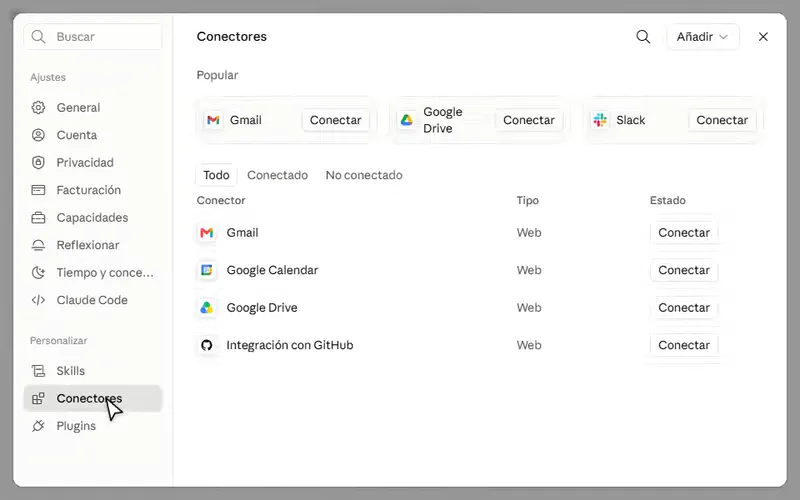
- Go to Connectors
Open Customize → Connectors or go directly to the connectors page. You should see the connectors available to your account and the Add button.
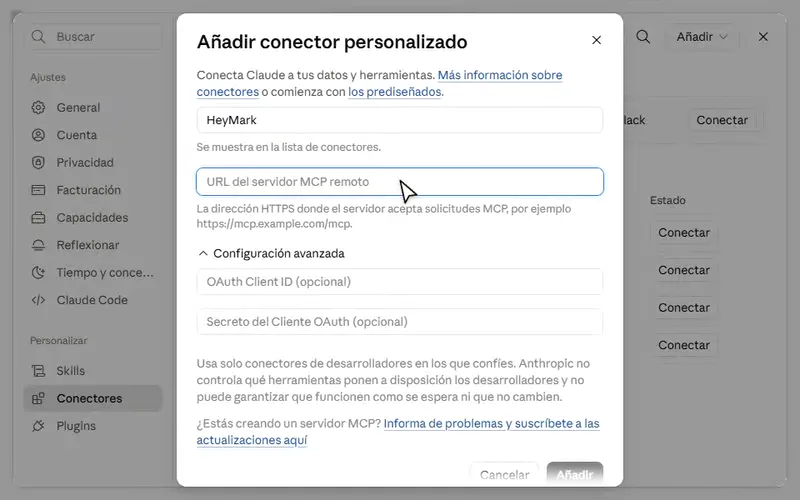
- Add a custom connector
Select Add → Add custom connector. Claude will ask for a name and the MCP server URL. On Team or Enterprise, the organization owner may need to add it first.
- Set up HeyMark and copy your MCP URL
Complete this short setup in HeyMark:
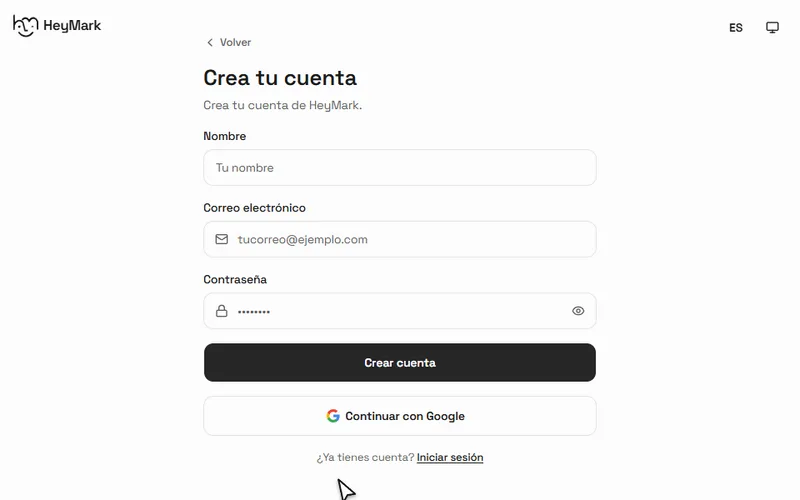
Open HeyMark and complete registration. It includes a 14 day free trial.
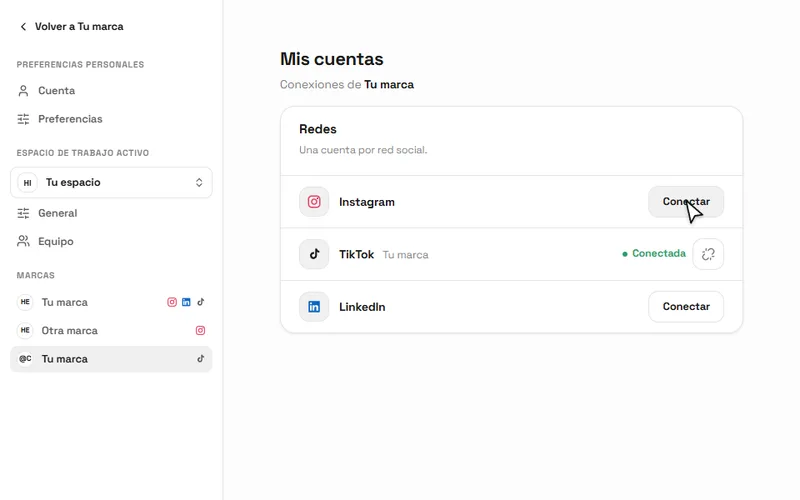
Open your brand and select Connect next to Instagram.
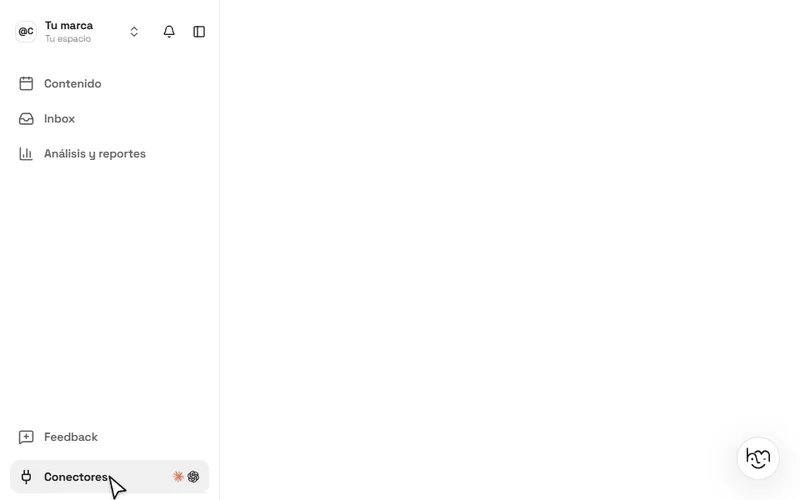
Return to the app and open Connectors from the sidebar.
Select Copy URL so you can take it to the Claude form.
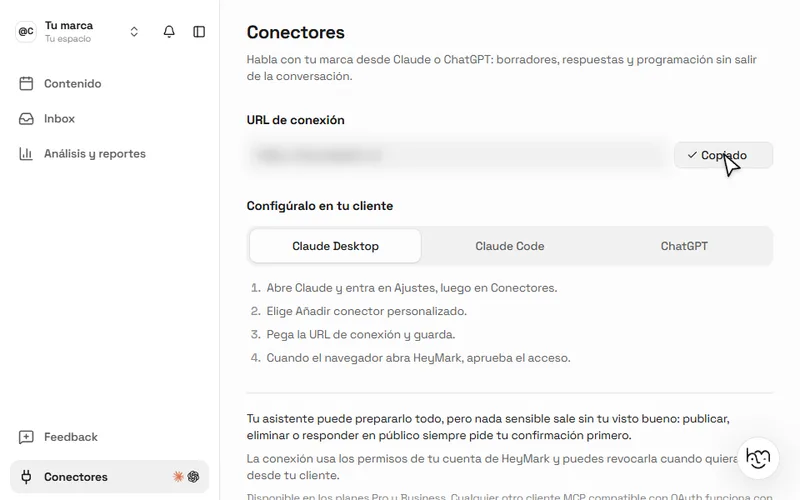
If your HeyMark and Instagram accounts are already connected, start directly in Connectors. Everyone uses the same server URL; the authorization you complete next connects Claude to your workspace.
- Paste the URL into Claude
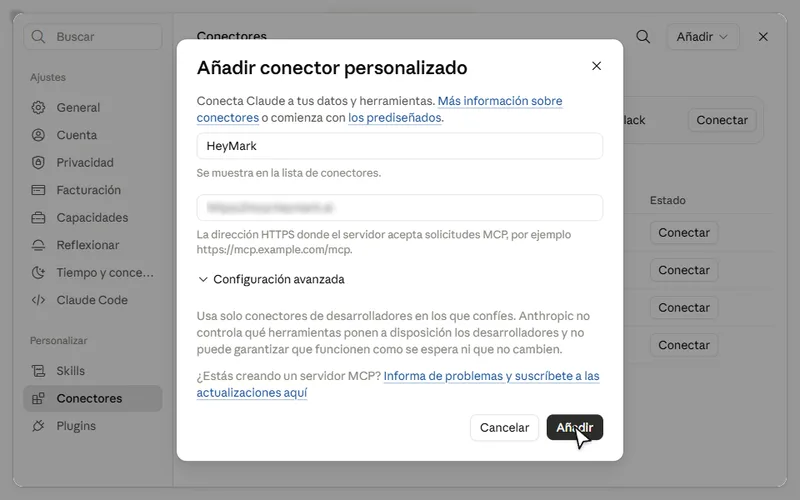
Return to the form, name the connector HeyMark, paste the URL, and select Add. If an authorization flow appears, review and complete it. HeyMark should now appear in your configured connectors.
- Connect, authorize, and enable HeyMark
Complete these three checks before starting the analysis:
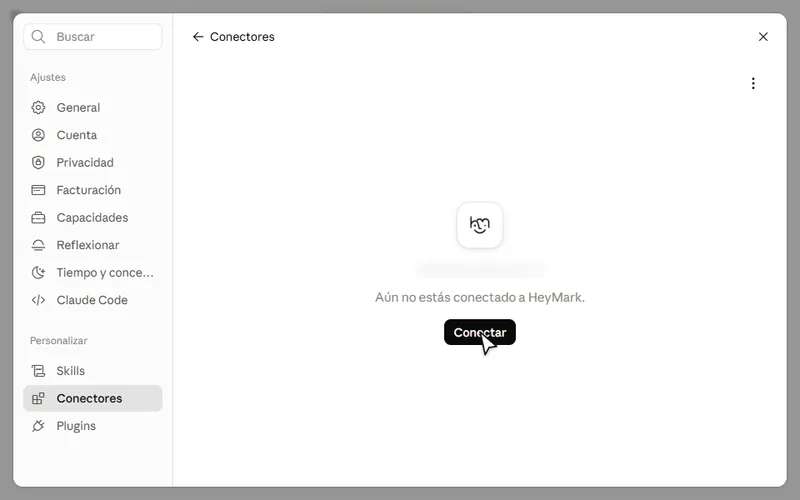
Open HeyMark in your connector list and select Connect to begin authorization.
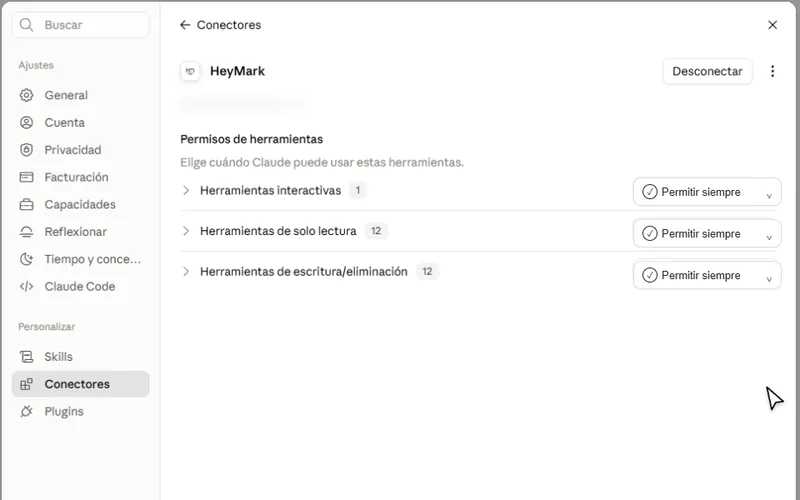
After authorizing, return to Connectors → HeyMark. All three categories default to Needs approval: change each one to Always allow.
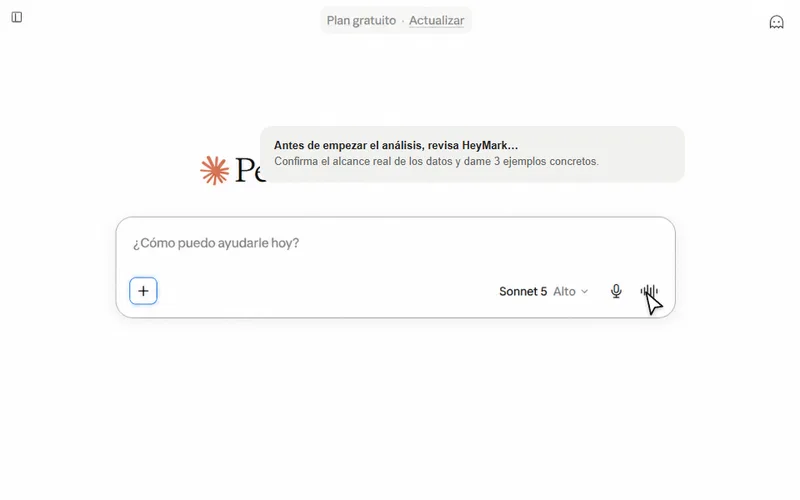
Open a chat, select +, open Connectors, and leave HeyMark enabled for that conversation.
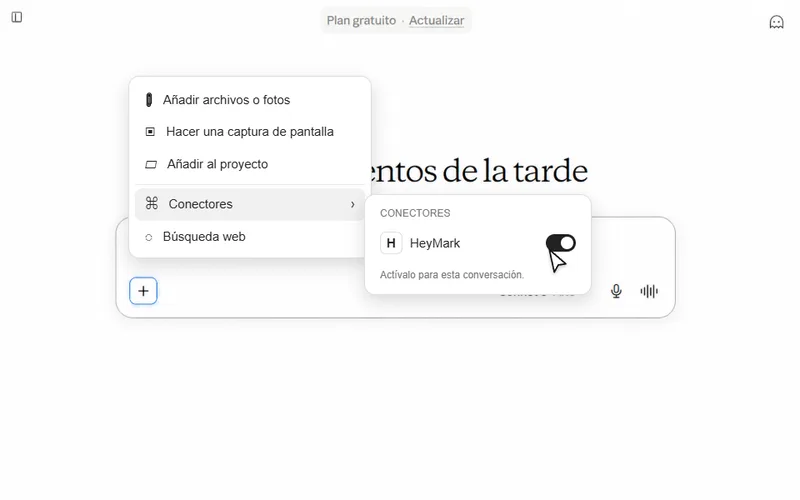
Once all three categories are set to Always allow and the HeyMark toggle is on, the connector is ready in that chat.
- Run a short test
Before using the long prompt, confirm that Claude is reading HeyMark instead of answering from general knowledge. Open and copy the verification prompt, paste it into the chat, and send it. The response should include specific data from your account or explain what Claude cannot access.
Verification prompt: paste this first
Before starting the analysis, review HeyMark and tell me exactly what information you can access from my Instagram account.

Tell me:
1. Which Instagram account or accounts are available to you.
2. How many posts you can access and from what period.
3. Which metrics are available for each post.
4. Which follower or audience data is available.
5. Which information is NOT available.

Do not make recommendations yet. Only confirm the actual scope of the data you can read from HeyMark and give me 3 specific examples of posts or metrics you found.
- Paste the master prompt
If the test returned specific data, open and copy the master prompt, paste it into the same conversation, and send it. The result should cite real posts and metrics and clearly identify which parts are hypotheses.
Master prompt: with the connector enabled
Analyze my Instagram account using only the information available through HeyMark.

Before reaching any conclusions, review the post history and available metrics. If a data point does not exist or you cannot access it, say so and do not estimate it.

Use widgets.

Complete the analysis in this order:

1. Account snapshot
Summarize what is happening with my content today in 5 to 8 findings. Prioritize specific patterns over general advice.

2. Best performing content
Identify my best performing posts. For each one, review the format, topic, hook, caption, CTA, date, time, and every metric available to you. Explain what they have in common and what probably made them work.

3. Worst performing content
Look for recurring patterns in posts that perform below my usual results. Separate what the data demonstrates from what is only a hypothesis.

4. Audience
Analyze everything HeyMark makes available about followers, reach, interactions, comments, and audience behavior. If detailed demographic data does not exist, do not invent it. In that case, infer interests only from content and comments you can actually access, and label those conclusions as hypotheses.

5. Content formula
Summarize which topics, formats, approaches, and types of hooks I should repeat more often. Also tell me what I am doing too much and which opportunities I am not using yet.

6. Account growth strategy
Propose a specific strategy for the next 30 days. Include organic content, distribution, collaborations, ways to repurpose my best posts, actions in comments or DMs when appropriate, and 5 growth experiments.

For each experiment include the hypothesis, the exact action, the metric to measure, and the result that would count as a positive signal. Use my own historical performance as the reference whenever possible.

7. Ideas ready to execute
Give me 12 post ideas based on patterns that have already worked for my account. For each idea include the format, concept, opening hook, and objective.

8. Executive summary
Finish with three clear sections: what to keep, what to change, and what to test this week.

Connect every recommendation to a real post, pattern, or metric whenever possible. Avoid generic phrases such as "post more," "be consistent," or "know your audience" unless you explain exactly what they mean for this account.
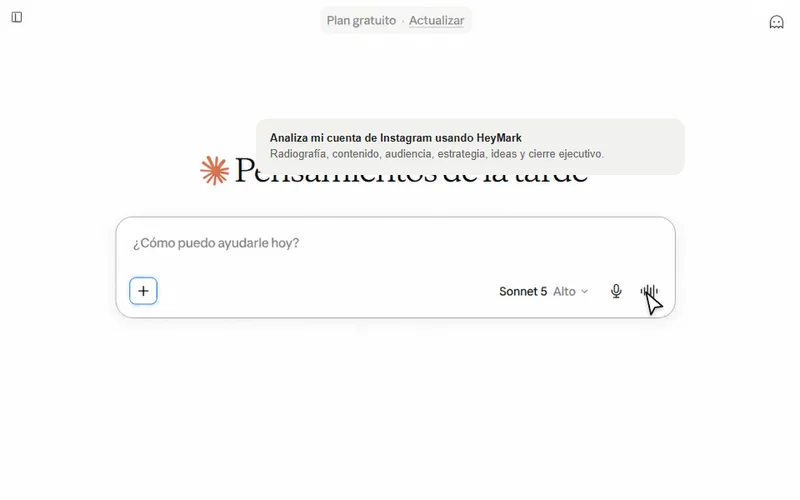
Keep working with your results
Once Claude finishes the analysis, open the prompt you need to turn it into a specific next step.
Turn it into a 30 day calendar
Use the previous analysis and turn it into a 30 day content calendar.

Do not invent a new strategy. Build the calendar from the patterns you already found in my account.

For each piece include the day, format, idea, hook, objective, CTA, and the reason you are proposing it. Keep a realistic mix of formats and clearly identify which pieces are experiments. (use widgets)
Reconstruct the formula behind the best posts
Focus only on my best performing posts now.

Compare them with one another and reconstruct a repeatable formula: topics, hook structure, format, caption style, CTA, posting rhythm, and any interaction pattern you find.

Then propose 10 new variations that preserve the same logic without copying the original content.
Remove generic recommendations
Review your previous recommendations and remove everything generic.

For each recommendation, add:
1. Evidence from my account.
2. What it means.
3. A specific action.
4. The metric I should monitor.

If a recommendation cannot be supported by real data or a real pattern, label it as a hypothesis.
What to expect from the result
The clearest sign that it worked is that you recognize your account in the response. You should see specific posts, metrics, and patterns, not a strategy that could apply to any profile. The result should include:
- A short account snapshot with observable findings.
- The best and worst posts, with patterns explained using real data.
- An audience analysis that does not invent demographic data when HeyMark does not provide it.
- A repeatable content formula, not a list of best practices.
- A 30 day strategy with five experiments and one metric for each.
- Twelve ideas ready to execute, based on what has already worked for your account.
Common problems
HeyMark appears in Settings, but Claude does not use it
Open the chat, select +, go to Connectors, and confirm that HeyMark is enabled for that conversation.
Claude responds too generally
Run the verification prompt first. Then ask Claude to connect every conclusion to a specific post, pattern, or metric.
Some posts or metrics are missing
Confirm in HeyMark that you are viewing the correct Instagram account and that the history you need is already available there.
"Add custom connector" does not appear
On organization accounts, availability may depend on the owner’s permissions. Review the organization’s connector settings or ask the owner to add it first.
The MCP URL appeared in a public screenshot
The server URL is public, so it does not need to be hidden or regenerated. Access still requires your OAuth approval. Never publish access tokens, and revoke the connector if you no longer trust an authorized client.
Useful links
- HeyMark: information and access.
- Claude: open a new conversation.
- Claude Connectors: go directly to the settings page.
- Official Claude Help Center: documentation about MCP connectors.