News OpenAI
OpenAI DevDay 2026: dots, GPT-6.1 Sol and the new Space
OpenAI introduces agents that keep working, a more capable Sol and shared AI pages. What changes, what the API costs and what you can use now.
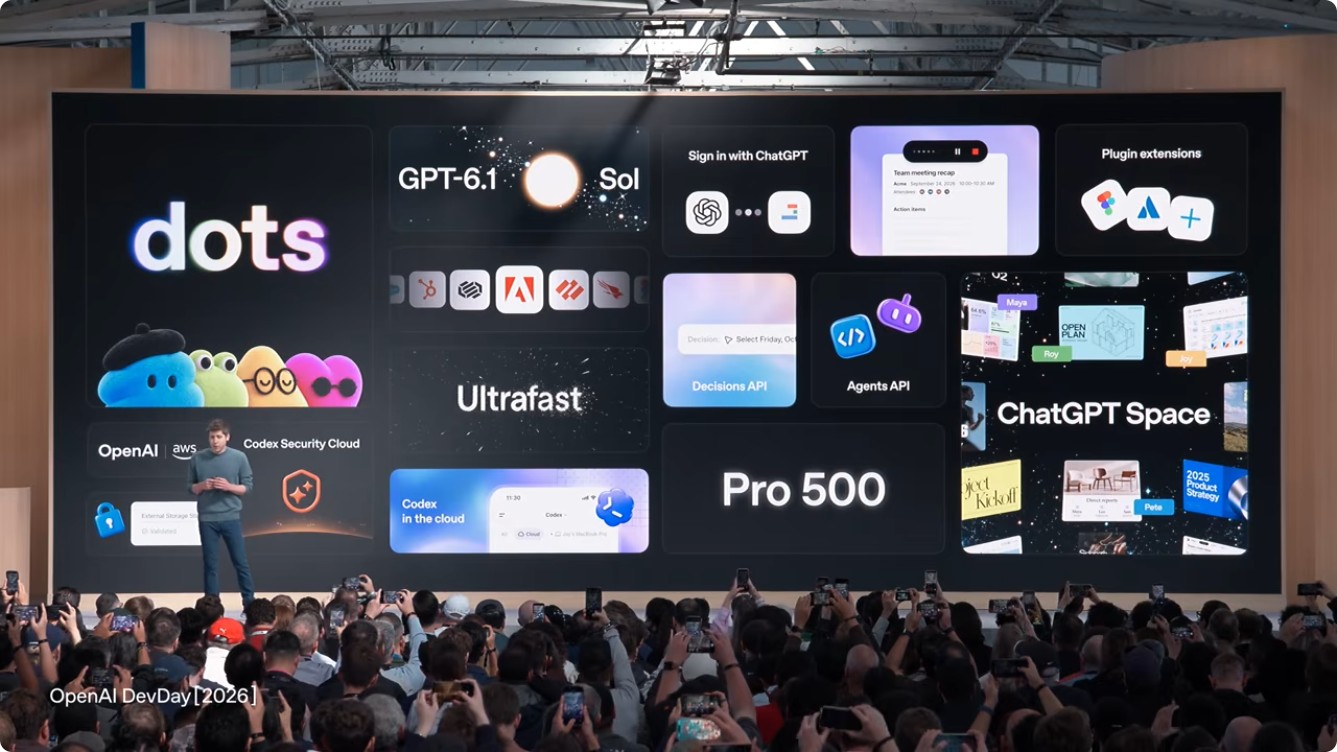
OpenAI introduced dots, GPT-6.1 Sol and ChatGPT Space at DevDay 2026 on September 29. The keynote covered agents that keep tasks moving, collaboration inside ChatGPT and updates for developers building applications.
The faces in the teaser we explored yesterday now accompany a product announcement: dots. The demos showed work being delegated and reviewed later. Some features are rolling out; others remain previews or are coming later.
Availability
dotsRolling out
Agents with persistent context and a cloud computer. Pro and Business Premium in eligible markets; enterprise beta requires admin activation.
Check availability ↗GPT-6.1 SolAvailable
In the API, Codex and ChatGPT Work. Not yet in Chat. Sol Ultrafast will follow.
Check availability ↗Space + PagesAvailable by plan
Shared pages for people and agents. Create and edit on web and desktop; find, read and share on mobile. Collaborative slides are coming later.
Check availability ↗What are OpenAI dots?
Dots use GPT-6 Astra, retain context and work on their own cloud computer. You can follow a task from ChatGPT, Slack or Teams. OpenAI positions them for ongoing responsibilities, such as checking information and preparing work for approval.
Your first dot is included in eligible plans, with a work allowance. Tasks it delegates to Codex or Work count toward their usual limits. Review connected apps and approval rules before delegating.
GPT-6.1 Sol: API pricing and performance
OpenAI presents GPT-6.1 Sol as approaching Astra in its evaluations at lower token prices. That comparison depends on the task; testing it with our own materials is still ahead.
Sol 6.1 benchmarks against Sol, Astra and Opus
Choose a benchmark and a reasoning level. Each bar shows the score; the figure below it is the average task cost in that evaluation. Low, Medium, High, Xhigh and Max are reasoning settings, not subscription plans.
DeepSWE
DeepSWE 1.1 · software engineering tasks in real repositories.
- GPT-6.1 Sol
- 64.38%US$0.17 / task
- GPT-6 Sol
- 37.17%US$0.16 / task
- GPT-6 Astra
- 67.04%US$1.60 / task
DeepSWE
DeepSWE 1.1 · software engineering tasks in real repositories.
- GPT-6.1 Sol
- 73.01%US$0.42 / task
- GPT-6 Sol
- 56.64%US$0.38 / task
- GPT-6 Astra
- 72.79%US$3.08 / task
DeepSWE
DeepSWE 1.1 · software engineering tasks in real repositories.
- GPT-6.1 Sol
- 75.22%US$0.65 / task
- GPT-6 Sol
- 65.27%US$0.64 / task
- GPT-6 Astra
- 73.23%US$3.92 / task
DeepSWE
DeepSWE 1.1 · software engineering tasks in real repositories.
- GPT-6.1 Sol
- 71.90%US$0.79 / task
- GPT-6 Sol
- 66.59%US$1.00 / task
- GPT-6 Astra
- 74.12%US$4.43 / task
DeepSWE
DeepSWE 1.1 · software engineering tasks in real repositories.
- GPT-6.1 Sol
- 71.90%US$1.57 / task
- GPT-6 Sol
- 68.81%US$2.74 / task
- GPT-6 Astra
- 73.23%US$7.50 / task
AutomationBench
AutomationBench 1.0.6 · workflows using tools. Opus includes fallback models.
- GPT-6.1 Sol
- 24.70%US$0.16 / task
- GPT-6 Sol
- 21.16%US$0.19 / task
- GPT-6 Astra
- 30.30%US$1.08 / task
- Opus 5.5 + fallbacks
- 24.20%US$0.51 / task
AutomationBench
AutomationBench 1.0.6 · workflows using tools. Opus includes fallback models.
- GPT-6.1 Sol
- 31.70%US$0.19 / task
- GPT-6 Sol
- 26.94%US$0.21 / task
- GPT-6 Astra
- 34.10%US$1.27 / task
- Opus 5.5 + fallbacks
- 29.53%US$0.65 / task
AutomationBench
AutomationBench 1.0.6 · workflows using tools. Opus includes fallback models.
- GPT-6.1 Sol
- 33.20%US$0.23 / task
- GPT-6 Sol
- 31.20%US$0.24 / task
- GPT-6 Astra
- 37.10%US$1.44 / task
- Opus 5.5 + fallbacks
- 33.03%US$0.71 / task
AutomationBench
AutomationBench 1.0.6 · workflows using tools. Opus includes fallback models.
- GPT-6.1 Sol
- 35.50%US$0.25 / task
- GPT-6 Sol
- 33.18%US$0.27 / task
- GPT-6 Astra
- 39.00%US$1.50 / task
- Opus 5.5 + fallbacks
- 35.77%US$0.89 / task
AutomationBench
AutomationBench 1.0.6 · workflows using tools. Opus includes fallback models.
- GPT-6.1 Sol
- 36.10%US$0.30 / task
- GPT-6 Sol
- 31.96%US$0.34 / task
- GPT-6 Astra
- 41.40%US$1.73 / task
- Opus 5.5 + fallbacks
- 42.47%US$1.44 / task
OSWorld 2.0, offline set
OSWorld 2.0 · partial reward on the v2026.08.08 offline set; not the percentage of fully completed tasks.
- GPT-6.1 Sol
- 58.96%US$0.42 / task
- GPT-6 Sol
- 43.90%US$1.01 / task
- GPT-6 Astra
- 62.17%US$2.72 / task
OSWorld 2.0, offline set
OSWorld 2.0 · partial reward on the v2026.08.08 offline set; not the percentage of fully completed tasks.
- GPT-6.1 Sol
- 66.84%US$0.77 / task
- GPT-6 Sol
- 54.00%US$1.38 / task
- GPT-6 Astra
- 69.25%US$5.36 / task
OSWorld 2.0, offline set
OSWorld 2.0 · partial reward on the v2026.08.08 offline set; not the percentage of fully completed tasks.
- GPT-6.1 Sol
- 69.56%US$0.96 / task
- GPT-6 Sol
- 58.29%US$1.71 / task
- GPT-6 Astra
- 70.02%US$6.91 / task
OSWorld 2.0, offline set
OSWorld 2.0 · partial reward on the v2026.08.08 offline set; not the percentage of fully completed tasks.
- GPT-6.1 Sol
- 69.38%US$1.05 / task
- GPT-6 Sol
- 60.54%US$2.30 / task
- GPT-6 Astra
- 71.27%US$7.49 / task
OSWorld 2.0, offline set
OSWorld 2.0 · partial reward on the v2026.08.08 offline set; not the percentage of fully completed tasks.
- GPT-6.1 Sol
- 71.42%US$1.27 / task
- GPT-6 Sol
- 64.43%US$3.37 / task
- GPT-6 Astra
- 73.49%US$9.44 / task
Terminal-Bench Science 0.1
Terminal-Bench Science 0.1 · data analysis, simulations and other scientific tasks. This chart only reports Opus at Max, with fallback models.
- GPT-6.1 Sol
- 43.71%US$1.79 / task
- GPT-6 Sol
- 9.17%US$3.00 / task
- GPT-6 Astra
- 55.43%US$11.41 / task
Terminal-Bench Science 0.1
Terminal-Bench Science 0.1 · data analysis, simulations and other scientific tasks. This chart only reports Opus at Max, with fallback models.
- GPT-6.1 Sol
- 47.56%US$2.34 / task
- GPT-6 Sol
- 14.49%US$4.41 / task
- GPT-6 Astra
- 57.43%US$12.34 / task
Terminal-Bench Science 0.1
Terminal-Bench Science 0.1 · data analysis, simulations and other scientific tasks. This chart only reports Opus at Max, with fallback models.
- GPT-6.1 Sol
- 51.14%US$2.76 / task
- GPT-6 Sol
- 14.61%US$4.63 / task
- GPT-6 Astra
- 62.00%US$14.95 / task
Terminal-Bench Science 0.1
Terminal-Bench Science 0.1 · data analysis, simulations and other scientific tasks. This chart only reports Opus at Max, with fallback models.
- GPT-6.1 Sol
- 53.71%US$2.89 / task
- GPT-6 Sol
- 25.29%US$6.77 / task
- GPT-6 Astra
- 60.86%US$15.76 / task
Terminal-Bench Science 0.1
Terminal-Bench Science 0.1 · data analysis, simulations and other scientific tasks. This chart only reports Opus at Max, with fallback models.
- GPT-6.1 Sol
- 57.02%US$5.47 / task
- GPT-6 Sol
- 27.59%US$12.18 / task
- GPT-6 Astra
- 68.10%US$23.80 / task
- Opus 5.5 + fallbacks
- 63.33%US$23.21 / task
Higher scores are better. Average cost in this evaluation, not a fixed task price. OpenAI’s published results depend on tools and configuration. Data and methodology ↗
Three comparisons help explain the results:
- Code, High: Sol 6.1 scores 75.22% on DeepSWE, compared with Astra’s 73.23%. Average task costs are US$0.65 and US$3.92, respectively.
- Automation, Medium: Sol 6.1 reaches 31.70%; Opus 5.5 with fallback models reaches 29.53%. Costs are US$0.19 and US$0.65 per task.
- Science, Max: Astra retains an advantage: 68.10% against Sol 6.1’s 57.02%. Sol costs US$5.47 per task; Astra costs US$23.80.
In these results, increasing reasoning does not always improve the score. A coding benchmark’s task cost also cannot be assumed for marketing work: tools, tokens and success criteria differ.
What the API costs
| GPT-6.1 Sol | US$ |
|---|---|
| Input | 2.00 |
| Cached input | 0.10 |
| Output | 10.00 |
Official pricing. The model ID is gpt-6.1-sol. As a calculated example, 10,000 input tokens and 2,000 output tokens cost US$0.04, excluding tools and caching. A workflow with several calls accumulates usage.
Space and Pages: review work with your team
ChatGPT Space supports shared pages, comments and requests for ChatGPT or a dot to make changes. It is available on Pro, Business and Enterprise. At launch, mobile supports reading and sharing; editing will follow.
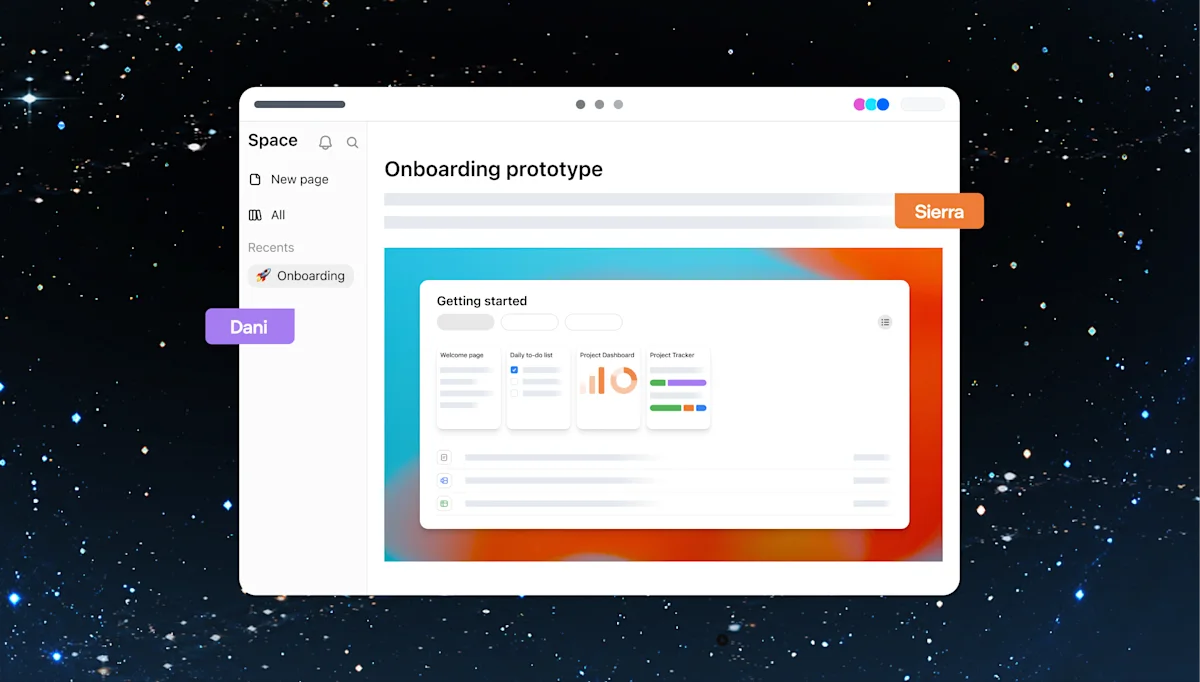
For a content team, we suggest testing it with a real brief: gather references, request a proposal and review changes on the page. Check whether it preserves brand decisions and distinguishes facts from assumptions.
Plugins and using your plan in other apps
Plugin extensions let developers add panels and editors inside ChatGPT. The keynote showed design and collaboration examples, including Adobe.
With Sign in with ChatGPT, Plus and Pro users can authorize participating apps to use their allowance. You can set a weekly limit per app. The app may charge separately for its own services.
More keynote announcements
- Ultrafast: OpenAI advertises up to 300 tokens per second in Codex. Generation speed alone does not measure how long a full task takes.
- Codex Security Cloud: reviews repositories, investigates findings and prepares fixes in the cloud.
- Decisions API: a limited preview for choosing among predefined answers with Luna.
- Agents API and Bedrock: computer use and new options for running agents.
- Pro 500, Private Intelligence and Marketplace: additional usage capacity and enterprise updates.
The official recap explains plans and availability. During the keynote, the voice demo ran into trouble and the presenter continued in the terminal. Before making a workflow part of daily work, test it on your own tasks.
For marketing, we would start with a small deliverable that is easy to check: a sourced report, a reviewed brief or a proposal with traceable changes. Our guide to analyzing social media with real data explains how to check the figures for that test. Compatibility between the new dots and HeyMark still needs testing.
Source
Plan your next post in HeyMark.
Keep the idea, review the draft with your team, and see how it performed in the accounts you connected.