Connect Instagram to ChatGPT to post and reply
Yes, you can connect Instagram to ChatGPT so it posts and replies, not just writes. You add HeyMark as an app with developer mode on, sign in with your account, and from the chat you build carousels, schedule, publish with your approval, read your metrics and answer comments and DMs.
By HeyMark · Reviewed by Crescente Martinez, CMO and co-founder of HeyMark · Updated
A clothing store types into ChatGPT: “Check which carousels did best for us in September and build one for the new collection.” ChatGPT looks at the real posts on its Instagram account, proposes the slides and leaves a draft on the brand’s calendar. That’s what you get when you connect Instagram to ChatGPT through HeyMark: ChatGPT stops being the thing that writes while you copy and paste, and works on your actual account, with your calendar, your metrics and your inbox of comments and messages.
The connection runs on HeyMark’s MCP server. MCP is the standard an assistant uses to work with outside tools, and there’s nothing to code here: you paste a URL, sign in with your HeyMark account, and ChatGPT sees what you see and nothing else.
What ChatGPT can do once Instagram is connected
Here’s what you can ask for, and what waits for your approval before it touches your account:
| You ask for | What it does | Waits for your approval? |
|---|---|---|
| A carousel based on what worked best | Reviews your posts and their metrics, proposes a structure and generates the slides | No need: nothing gets published |
| The post ready for Thursday | Creates the draft on your calendar with caption, target account and date | No: it stays a draft |
| Scheduling it | Queues it for the date and time you give | No: it runs right away, so check first |
| Publishing it now | Shows you a preview | Yes: it publishes once you approve |
| How you did | Reads followers, views and engagement against the previous period, plus your top posts | No: it only reads |
| Clearing the inbox | Reads pending comments and DMs and drafts each reply | Yes: each reply goes out once you approve it |
It can also hide comments or set up a rule that replies in public and sends a DM to anyone who comments a keyword (that’s how Instagram DM automation works), always with your approval. And the same connection covers TikTok, LinkedIn, Facebook and YouTube.
How to connect Instagram to ChatGPT, step by step
You need a HeyMark account with Instagram connected under My accounts (the trial runs 14 days) and ChatGPT in your browser. You only set this up once.
- Copy HeyMark's MCP URL
In HeyMark, open Connectors in the lower left corner and select Copy URL. It’s the same for everyone:
https://mcp.heymark.ai. The URL is public; what protects your account is the authorization you complete later. - Turn on developer mode
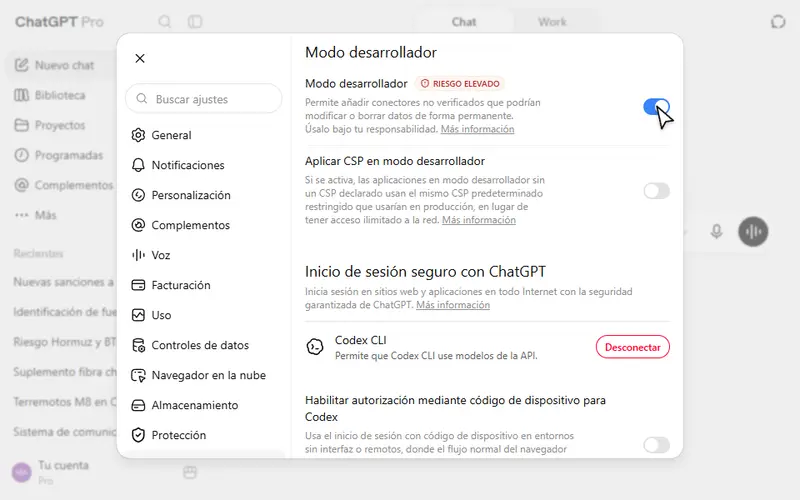
In ChatGPT, open Settings and go to Apps (your interface may call it Plugins, or Apps and Connectors). At the bottom, under the advanced settings, turn on Developer mode. ChatGPT warns you that custom apps can access external services.
Developer mode in ChatGPT's settings. - Create the HeyMark app
Open Apps from ChatGPT’s sidebar and select Create app. Enter HeyMark as the name, paste the URL into MCP server URL, confirm that you understand the warning and select Create.
Creating the HeyMark app with its name and MCP server URL. - Authorize with your HeyMark account
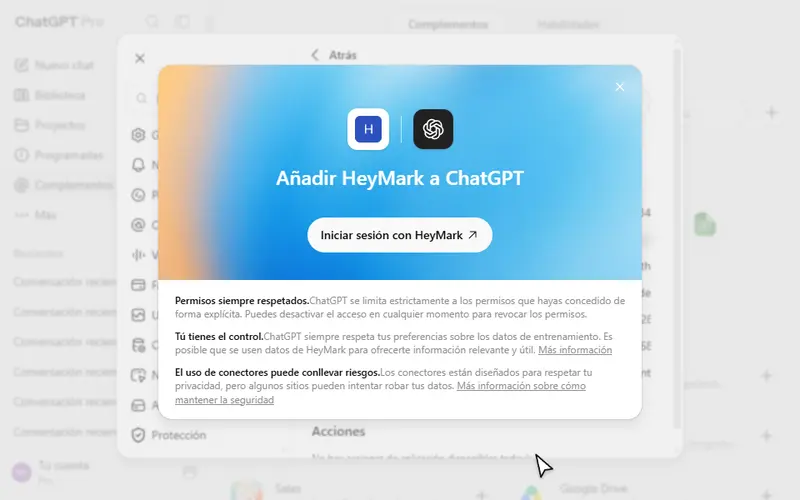
Select Sign in with HeyMark and approve the access. You land back in ChatGPT with HeyMark in your apps. There are no keys to copy: the connection uses OAuth.
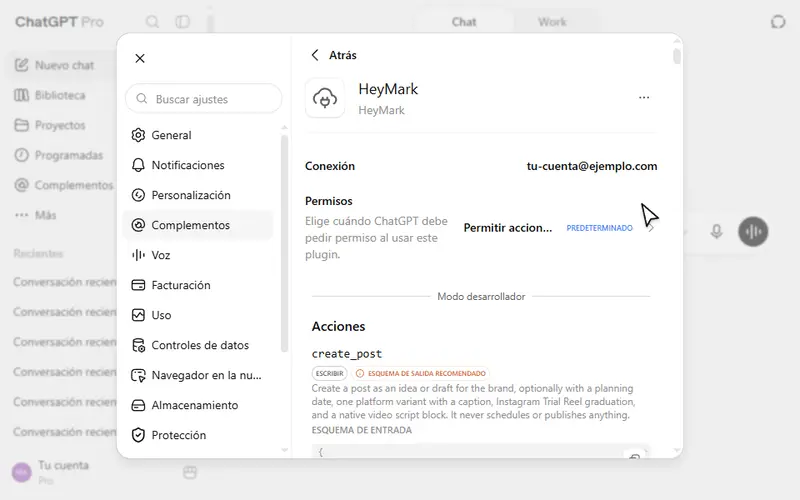
After you sign in, HeyMark shows up connected to your account, with its permissions and actions. - Allow the actions
In Settings, open Apps, select HeyMark and choose Allow all actions under Permissions. Only do this for the connection you created from your own account. The sensitive steps still wait for you: HeyMark asks for a preview before publishing now or replying.
- Turn it on in a chat
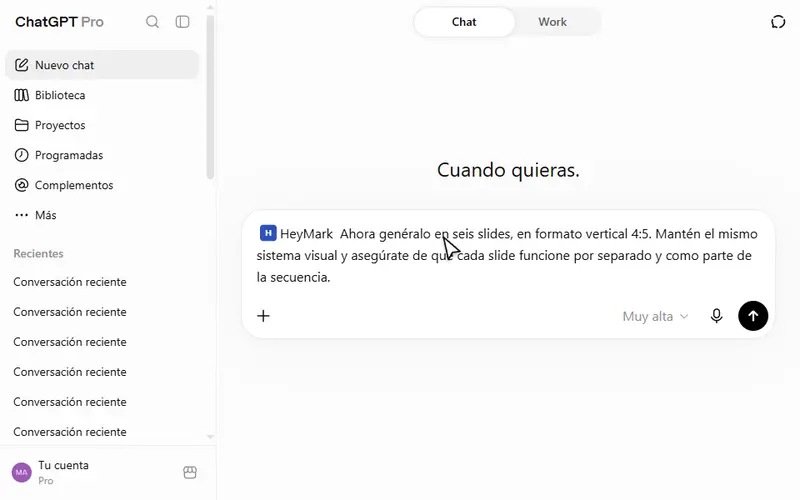
Open a new chat, select +, type Hey and pick HeyMark. Before writing your message, check that its name shows in the text field. To test it, ask it to list your brands.
Every screen and the most common problems are in the guide Carousels in 1 minute with ChatGPT + HeyMark.
Can ChatGPT post to Instagram?
Yes, and it goes past the caption: it creates the post, schedules it and publishes it, whether it’s a Reel, a story, a feed post or a carousel. Ask for the draft first and check the caption, account and date. Scheduling runs right away and the post goes out on its own at that time; publishing now goes through a preview you approve first.
One detail with carousels: the images ChatGPT generates stay in the chat. To get them into the post, upload them in HeyMark; in clients that support inline MCP apps, HeyMark can also open its media picker right there.
A carousel based on what already worked
Create a carousel for my brand using the style of the posts that performed best in my feed. Use HeyMark to review what I’ve already published and its metrics, and propose a six slide structure in a vertical 4:5 format.
From draft to schedule
Create a HeyMark draft for Instagram with this carousel’s caption. Show me the caption, the target account and the date before going further. Once I approve, schedule it for Thursday at 7:00 p.m. in my time zone.
Your numbers and your inbox, from the chat
For metrics, ChatGPT reads the same things you see in HeyMark: followers, views and engagement against the previous period, the reach of each post, and the age, gender, country and city of your audience. In the inbox, it tells you which conversations are waiting on an answer and drafts each reply in your brand’s voice. Nothing goes out until you approve the preview.
Clear the inbox with approval
Check my HeyMark inbox and tell me which Instagram comments and messages still have no reply. Suggest a reply for each one in my brand’s voice and don’t send any until I approve its preview. If one is a complaint, don’t reply: flag it for me.
Limits worth knowing
- No developer mode, no actions. ChatGPT only creates, schedules, publishes or replies with that mode on. It labels the mode high risk because it lets you add unverified connectors; use it for connections you know, like the one you create from your own HeyMark account.
- ChatGPT’s rules are ChatGPT’s. OpenAI decides which plans and workspaces allow custom apps, how much you can use them and what the subscription costs. Check their help article on developer mode.
- Cost on HeyMark. The MCP adds no cost on any plan; actions keep your plan’s limits and AI credits. There’s no free plan: a 14-day trial, then from $12 USD a month.
- Five networks. HeyMark publishes to Instagram, TikTok, LinkedIn, Facebook and YouTube. It doesn’t publish to X, Pinterest, Threads, Bluesky or Google Business Profile.
When something else fits better
- If you only want ideas and captions to copy by hand, you don’t need to connect anything: ChatGPT already writes without HeyMark.
- If you’d rather not turn on developer mode, Claude adds HeyMark as a custom connector from Settings, with no such step.
- If you work in a terminal with local files, Claude Code or Codex upload files from your computer straight into the post.
- If you already use Metricool and only need to schedule and read metrics, it has had an official ChatGPT connector since September 10, 2026. Of its 27 documented tools, 2 write (they schedule posts and edit scheduled ones); replying to comments or DMs isn’t among them, as checked on September 25, 2026.
To see what the MCP does on Instagram, tool by tool, go to the Instagram MCP server page.
Frequently asked questions
Can I connect Instagram to ChatGPT for free?
The MCP connection costs nothing extra on any HeyMark plan, but HeyMark has no free plan: you get a 14-day trial, then plans start at $12 USD a month. Whatever ChatGPT charges for your plan is separate.
Is it safe to give ChatGPT access to my Instagram?
ChatGPT signs in with your own HeyMark session through OAuth, with no keys to copy, and sees only what your account sees. Publishing now and replying wait for your approval, and you can revoke access at any time.
Can ChatGPT reply to Instagram DMs?
Yes. It reads your HeyMark inbox, drafts the reply and sends it once you approve the preview. If you want replies to go out without opening the chat, Mark handles that inside HeyMark.
Why does ChatGPT need developer mode?
HeyMark is added as a custom app with its own MCP server, and ChatGPT only runs actions such as creating or publishing while developer mode is on.
What happens if I disconnect HeyMark from ChatGPT?
Only the access goes away. Your scheduled posts, automations and conversations stay exactly where they were.
See it on your own accounts.
Connect Instagram, TikTok, Facebook, LinkedIn or YouTube and use HeyMark free for 14 days. Mark answers in your voice, and you approve what goes out.
Keep reading
- HeyMark in ClaudeConnect Instagram to Claude with HeyMark's custom connector: analyze your posts, plan the month, schedule, and reply to comments and DMs with your approval.
- Instagram MCP server: run your account from Claude or ChatGPTAn Instagram MCP server for Claude and ChatGPT: schedule Reels and carousels, reply to comments and DMs after you approve, and build comment-to-DM automations.
- AI agent for social mediaWhat an AI agent for social media does and how it differs from an assistant: it plans, writes in your voice, publishes, replies and reports, with your approval.
- Claude Code and CodexConnect Claude Code or Codex to HeyMark's MCP server with one command: upload local files, schedule campaigns with your approval, write reports to markdown.