Instagram MCP server: run your account from Claude or ChatGPT
Yes: HeyMark's MCP server connects your Instagram account to Claude, ChatGPT or any MCP client that supports OAuth. Your assistant can schedule Reels, Stories, posts and carousels, read your metrics, reply to comments and DMs, and set up comment-to-DM automations. Publishing right away, replying, hiding comments and turning on automations all wait for your approval.
By HeyMark · Reviewed by Crescente Martinez, CMO and co-founder of HeyMark · Updated
You type “schedule this Reel for Thursday at 7 p.m. and add @collaborator” into Claude, and the Reel is scheduled on your Instagram, collaborator included, and visible on your team’s calendar. That’s HeyMark’s Instagram MCP server at work. MCP is the standard that Claude, ChatGPT and other assistants use to connect to outside tools, and an Instagram MCP server gives your assistant access to your account under your own login and permissions.
HeyMark’s server goes beyond publishing. Your assistant works on the same things your team uses: the calendar, the inbox for comments and messages, the automations and the metrics. It runs in Claude, ChatGPT, Claude Code, Codex and any MCP client that supports OAuth, and access is free on every plan.
What your assistant can do on Instagram
Publish and schedule
It creates, schedules and publishes Reels, Stories, posts and carousels. It also handles Trial Reels, up to 3 collaborators, people tagged on each carousel photo and the first comment. If something misses an Instagram requirement, your assistant gets the error and fixes it with you.
Read how it went
It reads the reach, likes, comments and engagement of each post, plus your followers’ demographics: age, gender, country and city. It also reads the account overview, with followers, views and interactions against the previous period. HeyMark also imports posts someone on your team uploaded straight from the app, so your assistant analyzes the whole account.
Reply to Instagram comments and DMs with Claude
It reads each post’s comments and your inbox conversations, drafts replies in your brand’s voice and sends them once you approve. It can hide a comment, label a conversation, pause AI replies in it and review the ones escalated to a person. With AI DM automation on, Mark, HeyMark’s agent, answers on its own and escalates conversations that need a person. With automatic moderation you choose what to moderate: those comments are held for review, and deleting one from Instagram always needs your approval.
Automate by keyword
It creates keyword rules: when someone comments the word, it replies publicly and sends a DM; when someone sends the word by direct message, it answers on its own. Each rule takes up to 20 keywords, applies to one post or the whole brand, and uses no credits. If the post already had comments with that word, your assistant shows you how many it would process and processes them after you approve. How each rule works is covered in Instagram DM automation.
HeyMark in numbers
- 96,058
- comments and direct messages handled in the inbox in its first 58 days
- 8,599
- leads generated by comment and message automations in those same 58 days
What needs your approval
Reading changes nothing. When you ask for a change, this is what happens:
| You ask | What happens |
|---|---|
| “Schedule it for Thursday at 7 p.m.” | Scheduled right away, no preview |
| “Publish it now” | Preview, then your approval |
| “Reply to this comment” or “answer this DM” | Preview, then your approval |
| “Hide that comment” | Preview, then your approval |
| “Turn on this automation” | Preview, then your approval |
Scheduling doesn’t ask for confirmation, and the post goes out on its own at that time, so check the date, time and time zone before you ask. Each approval expires after five minutes and covers only that action: if the text or the account changes, you get a new preview. Your brand permissions apply to every call.
Prompts to try on Instagram
Replace what’s in brackets and paste them into a chat with HeyMark turned on.
Schedule a Reel with a collaborator
Create a Reel for my brand's Instagram with this caption: [caption].
Open the file picker so I can upload the video.
Add @[collaborator] as a collaborator and set this as the first comment: [text].
Show me the draft and wait for my confirmation before scheduling it for Thursday at 7 p.m. [city] time.
Comments asking about price
Go through the comments on my latest Instagram Reel.
Which ones ask about price or availability?
Draft a short reply to each, in the brand's voice.
Don't post anything: wait until I approve each reply.
Comment-to-DM on a keyword
On my latest Instagram Reel, create an automation: if someone comments CATALOG, reply publicly with "Sent it to your DMs" and send them this link by direct message: [catalog link].
Show me the rule before turning it on.
Then tell me how many earlier comments with CATALOG it would process and wait for my approval.
Catch up on DMs
Which Instagram conversations in the inbox are waiting on a reply?
Sum up each one in a line and tell me which ones were escalated to a person.
Draft replies for the three oldest and don't send anything without my approval.
What worked this month
Compare my Instagram Reels and carousels from the last 30 days by reach, likes, comments and engagement.
Tell me what the top three have in common and which countries and cities most of my audience comes from.
If a number is missing, say so and don't estimate it.
How to connect Instagram to Claude or ChatGPT
- Connect your Instagram in HeyMark
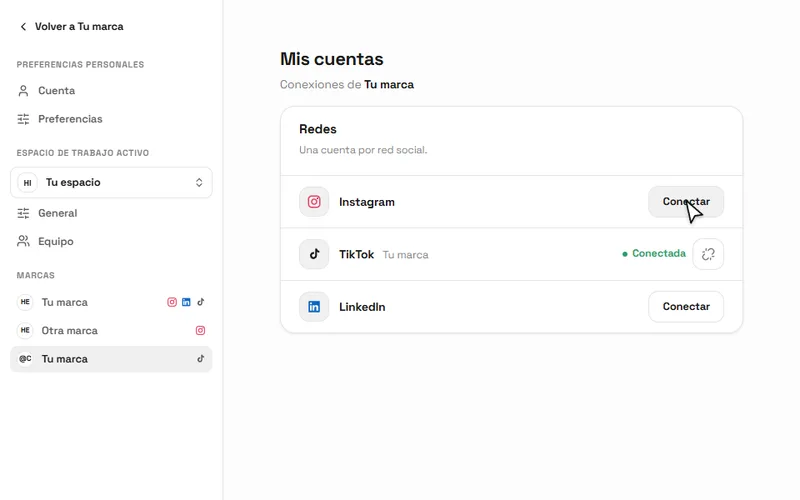
In your brand, open My accounts and choose Connect next to Instagram. HeyMark pulls in what you already published and lays it out on the calendar.
My accounts in HeyMark: one account per network in each brand. - Add HeyMark to your assistant
The URL is
https://mcp.heymark.ai. In Claude it goes in as a custom connector (step by step for Claude), and ChatGPT needs developer mode (step by step for ChatGPT). Claude Code and Codex take one command, listed in the MCP documentation. - Approve the access and run a quick check
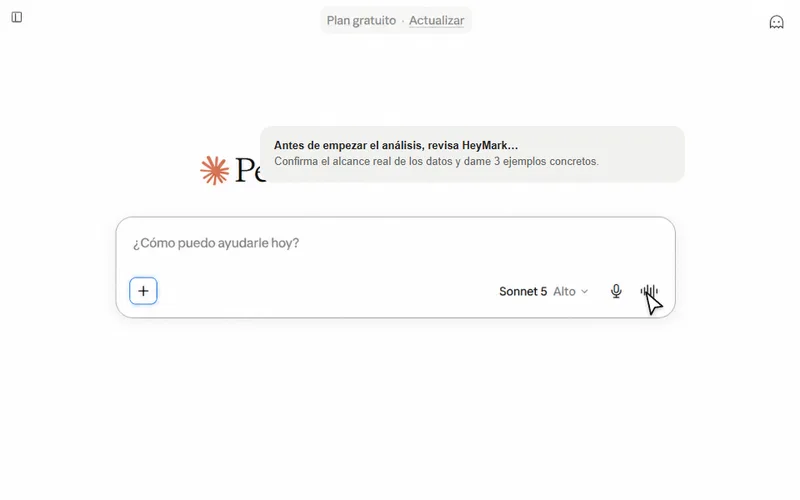
HeyMark opens in your browser so you can approve the access with your account. In Claude, make sure HeyMark is turned on in the chat. Then ask it to list your brands and tell you which Instagram account it sees and what data it can read.
A quick check in Claude before the first change.
Other Instagram MCP servers, by type
Searching “Instagram MCP” turns up options that do different things with your account:
| Type | What it does with your Instagram | A fit when |
|---|---|---|
| Generic connector catalog | Offers individual Instagram actions next to actions for other apps | You already build workflows on that platform and need one step, like posting a photo |
| Public data scraper | Reads public profiles and posts. It doesn’t act on your account | You’re researching other accounts |
| Metricool’s MCP | As of September 2026, 27 documented tools: 25 that read and 2 that write (schedule and edit scheduled posts) | You want deeper analytics, more networks or a free plan |
| HeyMark’s MCP | Publishes Reels, Stories, posts and carousels, reads metrics, replies to comments and DMs after you approve, hides comments and builds automations | You want your assistant to run the whole account alongside your team |
| Fact | HeyMark | Metricool |
|---|---|---|
| MCP server | Yes, free on every plan. Publishes, replies to comments and DMs, moderates, automates and shares reports and calendars | Yes, on every plan: 27 documented tools, 2 that write (schedule and edit scheduled posts) |
| Comment-to-DM automation | Included on every plan, no credits spent: keyword public reply and DM on Instagram, Facebook and TikTok; public reply also on LinkedIn and YouTube | Flows (since September 2026): keyword replies with up to 3 fixed texts, on Instagram and TikTok. Free for a limited time, then a paid add-on |
| Comment moderation | Automatic moderation: hides, holds for review or deletes comments, with your approval to delete | The inbox can't hide or delete comments. On TikTok, Flows hides comments with banned words |
Metricool has real advantages: official connectors in the Claude and ChatGPT directories since September 10, 2026, a free plan, deeper analytics, and networks HeyMark doesn’t cover, such as X, Pinterest and Google Business Profile. HeyMark goes into Claude as a custom connector, and in ChatGPT its actions need developer mode. The full comparison, with names and dates, is in the best social media MCP servers.
What it doesn’t do
- It isn’t an official Meta MCP server. It uses the account you connected in HeyMark, with your permissions.
- Each brand connects one Instagram account. Two accounts means two brands.
- It doesn’t manage paid ads.
- There’s no public REST API yet. If you’re building your own software, an API provider is the better fit.
- In Claude or ChatGPT, you pick files in HeyMark’s file picker, in clients that show it; in Claude Code or Codex, the agent uploads them from your computer.
- Instagram accepting the request doesn’t mean the post is live. Ask your assistant to check the actual status and the post link.
Frequently asked questions
Is this an official Meta MCP server?
No. It's HeyMark's MCP server. It works through the Instagram account you connected in HeyMark, with your permissions, and your assistant sees what you see and nothing else.
How much does the Instagram MCP cost?
MCP access is free on every HeyMark plan; Creator costs $12 USD a month, and every plan starts with a 14-day free trial. An AI-written reply or DM uses 1 credit, keyword automations use none, and your AI client may charge separately.
Do I need to know how to code?
No. You paste one URL into Claude or ChatGPT, sign in with your HeyMark account and approve the access. There are no keys to generate.
Can it answer Instagram DMs?
Yes. Your assistant reads the inbox conversations and drafts a reply, and the message goes out only after you approve the preview.
Does it work with ChatGPT?
Yes, with developer mode on. ChatGPT only runs actions such as creating or publishing while that mode is active.
Is it safe to give an assistant access to my Instagram?
You sign in with OAuth, with no keys to generate, and you can revoke access at any time. Publishing right away, replying and hiding comments need your confirmation, and the server accepts up to 60 tool calls a minute.
See it on your own accounts.
Connect Instagram, TikTok, Facebook, LinkedIn or YouTube and use HeyMark free for 14 days. Mark answers in your voice, and you approve what goes out.
Keep reading
- Instagram DM automationInstagram DM automation for comments: anyone who comments your keyword gets a public reply and a DM with your link. On every HeyMark plan, no credits spent.
- TikTok MCP server: post to TikTok from Claude or ChatGPTPost to TikTok from Claude or ChatGPT with HeyMark's MCP server: videos and photo carousels, privacy, Duet, Stitch and commercial content disclosures.
- HeyMark in ClaudeConnect Instagram to Claude with HeyMark's custom connector: analyze your posts, plan the month, schedule, and reply to comments and DMs with your approval.
- HeyMark in ChatGPTConnect Instagram to ChatGPT through HeyMark so it can build carousels, schedule, publish with your approval and answer comments and DMs from the chat.
- Best social media MCP serversThe best social media MCP servers, compared with dated data: which ones publish, which reply to comments and DMs, how they connect and what they cost.