Schedule social media posts with every network's options
HeyMark schedules posts on Instagram, TikTok, LinkedIn, Facebook and YouTube from the same post where the idea, script and caption live, with each network's options: Reels, stories, carousels, TikTok videos, LinkedIn documents and Shorts. You can also schedule from Claude or ChatGPT. It doesn't publish to X, Pinterest, Threads, Bluesky or Google Business Profile.
By HeyMark · Reviewed by Crescente Martinez, CMO and co-founder of HeyMark · Updated
When you schedule social media posts, things rarely break at the schedule button. They break earlier: the idea is in one doc, the script in another, the caption in a chat and the video on someone’s laptop. In HeyMark all of that lives on the post that eventually goes out, with each network’s options in view, and you schedule it to Instagram, TikTok, LinkedIn, Facebook or YouTube. If you work with an AI assistant, you can also schedule from Claude or ChatGPT.
You plan where it gets published
A scheduling app doesn’t help much if the work is still spread across five places. In HeyMark every post keeps the idea, the script and the caption together. It has a status, a date and an owner; the team comments and uploads versions right there, and the activity log shows who did what. You see the month as a calendar or as a board by status. When you connect your accounts, HeyMark pulls in what you’ve already published and lays it out on the calendar with its video, caption and numbers. Anything someone on the team posts straight from Instagram shows up too, so the calendar shows what actually went out, not just what someone scheduled.
HeyMark in numbers
- 9,000+
- posts scheduled and published from HeyMark
A social media scheduler that knows each network
You pick the destination and HeyMark shows you that platform’s limits before you write too much. Here’s what you can schedule on each network today:
| Network | What you schedule and what you set |
|---|---|
| Reels, stories, posts and carousels, Trial Reels included. Up to 3 collaborators, people tagged on each carousel photo and the first comment | |
| TikTok | Videos and photo carousels, with a title. Privacy, duets and stitch, plus the commercial content and AI-generated content labels |
| Posts and documents, which is how carousels go out as PDFs, with mentions of people and companies | |
| Posts, Reels and stories | |
| YouTube | Videos and Shorts, with visibility and the made-for-kids setting |
Each post takes up to 35 files, and you can trim video without leaving HeyMark.
Scheduling to TikTok and LinkedIn without redoing the work
What you built for Instagram you duplicate for TikTok in one click, without re-uploading the file or copying the caption. Then you adjust what’s specific to TikTok, like the title, the privacy or whether you allow duets, and schedule it for the time that works. On LinkedIn, a carousel goes up as a PDF document, and you mention the people and companies involved in the text.
If you work with clients, the approval link comes on every plan, so sign-off happens before you schedule. How that works across several brands: HeyMark for agencies.
Scheduling from Claude or ChatGPT
If you already work with an assistant, you don’t need to open HeyMark to schedule. With the MCP server, free on every plan, Claude or ChatGPT create the post, upload the file, duplicate it and schedule it with your permissions. What it can do in each format is on the Instagram MCP page.
Duplicate a Reel for TikTok and schedule both
Use HeyMark with the brand brand name. Take the Reel draft draft title and duplicate it for TikTok, with the same file and the same caption. Before scheduling, show me both posts with their network, format, caption, date, time and time zone. Once I approve, schedule them for Thursday at 7:30 p.m. Eastern.
Scheduling runs directly, with no preview. That’s why the prompt asks to see the date, time and time zone first. Publishing right away does ask for your confirmation. In ChatGPT, creating or publishing requires developer mode. And if you’d rather not write the caption, HeyMark’s AI agent proposes it in your brand’s voice for you to approve.
What happens after it goes out
Scheduling isn’t the end. Before the post goes into the queue, you can attach a comment automation to it: anyone who comments the keyword gets a public reply and a DM, with no credits spent. Once the post is live, comments and messages land in the inbox, where you or Mark answer them in your brand’s voice, and the post collects its metrics: reach, likes, comments and engagement. It all stays on the same post, next to the idea and script it started from.
When another tool fits better
HeyMark doesn’t publish to X, Pinterest, Threads, Bluesky or Google Business Profile. If you need them, Metricool covers all of those (X is a paid add-on) and Buffer includes X, Threads and Bluesky among its 12 networks. Both have free plans and HeyMark doesn’t: it has a 14-day trial. If you only schedule a few posts and don’t reply to comments or messages, Metricool’s free plan (1 brand, 20 posts a month, no LinkedIn) or Buffer’s may be enough. To compare more options, see the Buffer alternatives.
| Fact | HeyMark | Metricool | Buffer |
|---|---|---|---|
| Networks | Instagram, TikTok, Facebook, LinkedIn and YouTube | Instagram, Facebook, TikTok, LinkedIn, YouTube, Pinterest, Threads, Bluesky, Twitch, Google Business Profile and X ($10 USD add-on per account) | 12 networks, including Instagram, TikTok, LinkedIn, Facebook, X, Threads and Bluesky |
| Free plan or trial | No free plan. 14-day free trial on every plan | 1 brand, 20 posts a month and 30 days of analytics. No LinkedIn or X | Yes, with channel and post limits |
| Starting price | $12 USD a month (Creator: 1 brand, 1 person). Company: $30 USD with 3 brands and 5 people | Free plan. Starter from $20 USD a month billed yearly ($25 monthly) for 5 brands | Free plan. Paid plans charge per channel, from about $6 USD a month per channel |
| MCP server | Yes, free on every plan. Publishes, replies to comments and DMs, moderates, automates and shares reports and calendars | Yes, on every plan: 27 documented tools, 2 that write (schedule and edit scheduled posts) | Yes, on every plan (since May 2026): posts, ideas and metrics. No comment or DM tools |
How to schedule social media posts with HeyMark
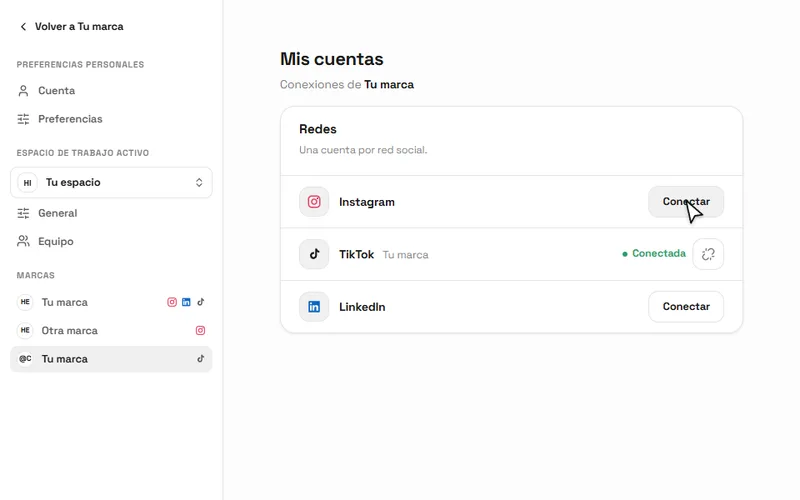
- Start the 14-day trial and connect your accounts. HeyMark pulls in what you’ve already published.
- Create a post with the idea, script and caption, and give it a date and an owner.
- Pick the network and format, upload the files and check that network’s options.
- Schedule it. If it’s also going to TikTok, duplicate it first and adjust the title.
Frequently asked questions
Can you schedule Instagram Reels?
Yes. HeyMark schedules Instagram Reels, stories, posts and carousels, plus Trial Reels. Before scheduling you can add up to 3 collaborators and set the first comment.
How do I schedule to several networks at once?
Build the post once and duplicate it for the other network in one click, without uploading the file again. Then adjust what's specific to each network, like the title and privacy on TikTok, and schedule each one.
Do I need to install an app to schedule posts?
No. HeyMark runs in the browser: you connect your accounts and schedule from there. You can also schedule from Claude or ChatGPT connected over MCP.
Is there a free social media scheduler?
HeyMark has no free plan: it has a 14-day trial and then starts at $12 USD a month. If you only schedule a few posts, Metricool and Buffer have free plans with limits.
Can I schedule a LinkedIn carousel?
Yes, as a document: LinkedIn carousels are published as PDFs. You can mention people and companies in the text.
What happens if someone on my team posts straight from Instagram?
It shows up on its own in HeyMark's calendar next to what you scheduled, with its video, caption and numbers.
See it on your own accounts.
Connect Instagram, TikTok, Facebook, LinkedIn or YouTube and use HeyMark free for 14 days. Mark answers in your voice, and you approve what goes out.
Keep reading
- Social media management tool for agencies, with client approvalsA social media management tool for agencies: one brand per client, client approval links on every plan, an AI inbox in each brand's voice and MCP for Claude.
- Instagram MCP server: run your account from Claude or ChatGPTAn Instagram MCP server for Claude and ChatGPT: schedule Reels and carousels, reply to comments and DMs after you approve, and build comment-to-DM automations.
- AI agent for social mediaWhat an AI agent for social media does and how it differs from an assistant: it plans, writes in your voice, publishes, replies and reports, with your approval.
- Buffer alternatives in 2026: when scheduling isn't enoughBuffer alternatives as of September 2026: HeyMark, Metricool, Later and Hootsuite compared on price, free plan, AI replies and MCP, plus when to stay on Buffer.