Schedule Instagram Reels, including Trial Reels, collabs and the first comment
By HeyMark · Reviewed by Crescente Martinez, CMO and co-founder of HeyMark · Updated
If you plan Reels with collaborators, Trial Reels or a first comment, check the scheduling options before choosing a tool. Instagram’s app does not schedule collaborative posts. Compare what the app supports with HeyMark’s Reel options, including Trial Reels, before choosing where to schedule each one.
What the Instagram app schedules, and what it doesn’t
According to Instagram’s Help Center, as of September 2026:
- You need a public account.
- You can schedule Reels, photos and carousel posts.
- You can schedule up to 25 posts a day, up to 30 days in advance.
- Scheduled content keeps the privacy and audience settings it had when you scheduled it.
- Product tagging, collaborative posts, sponsored posts and fundraisers aren’t compatible with scheduled content.
If your Reel needs none of that, the app is enough, and it’s free.
What you set in HeyMark before scheduling a Reel
In HeyMark the Reel lives on the same post as the idea, the script and the caption. Before you schedule it, you set:
| Option | What it does |
|---|---|
| Trial Reel | The Reel is shown to non-followers first. Manual mode (you share it with your followers from Instagram) or performance-based (Instagram decides within the first 72 hours) |
| Collaborators | Up to 3 Instagram accounts per post |
| First comment | Scheduled together with the Reel |
| Cover | Your own image or a moment from the video |
| Share to feed | Whether the Reel also appears in your feed |
| Tagged people | On carousels, on each photo and in the spot you choose |
You can also trim the video without leaving HeyMark, see Instagram’s limits before you write too much and, if plans change, reschedule or unschedule.
HeyMark in numbers
- 9,000+
- posts scheduled and published from HeyMark
How to schedule Trial Reels
A Trial Reel is shown to people who don’t follow you first. According to Instagram’s Help Center, your followers don’t see it in their feed or in Reels, it stays off your profile unless you share it to everyone, and its insights show up within 24 hours. If you choose automatic sharing, Instagram shares it with your followers when it performs well based on the views it gets in the first 72 hours (Instagram for Creators).
Two things to know before you schedule one:
- Instagram sets the requirements, and they change. As of September 2026, the Help Center asks for a public account with at least 200 followers if it’s a professional account, or 1,000 if it’s personal. An account that isn’t eligible to appear in recommendations loses access to Trial Reels.
- It has to be new content. Instagram warns that a Trial Reel may get limited reach if it detects you’ve already shared the same content.
In HeyMark you pick the mode when you create the Reel and schedule it like any other. In manual mode, sharing it with your followers is a step you take in Instagram. If you work with Claude or ChatGPT connected to HeyMark:
Schedule a Trial Reel
Use HeyMark with the brand brand name. Create an Instagram Reel as a Trial Reel, in performance-based mode, with this caption: caption. Open the file picker so I can upload the video. Before scheduling, show me the draft with the Trial Reel mode, date, time and time zone. Once I approve, schedule it for Thursday at 7 p.m. Eastern.
Scheduling runs right away, with no preview, which is why the prompt asks to see the draft first. How to connect your assistant, and what else it can do, is on the Instagram MCP server page.
Collaborators and the first comment
Collab posts are the ones the app won’t schedule. In HeyMark you add up to 3 collaborators to a scheduled Reel. Each one has to accept the invite in Instagram; once they do, the Reel is shared with their followers and shows on their profile, according to Instagram’s Help Center.
The first comment is scheduled together with the Reel. Use it for the reservations link, the credits or the question that starts the conversation, without stretching the main caption. And if the Reel asks people to comment a keyword, you can attach an automation before scheduling: anyone who comments the word gets a public reply and a DM, with no credits spent. How to set it up is in Instagram DM automation.
Other tools that schedule Trial Reels
HeyMark isn’t the only tool that schedules Trial Reels. Here’s what other tools’ help centers say, checked on September 25, 2026:
| Tool | Schedules Trial Reels? |
|---|---|
| Metricool | Yes, with the option to share it automatically based on performance in the first 72 hours (Metricool help) |
| Later | Yes, for public profiles with 1,000+ followers (Later help) |
| Buffer | No: it schedules regular Reels, but not Trial Reels (Buffer help) |
What’s different in HeyMark isn’t the Trial Reel. It’s that the scheduled Reel with its options, the approval link and, later, the comments in the inbox all live in the same tool.
When another tool fits better
If you post a few Reels and none of them are collabs, the Instagram app is free and enough. If you also post to X, Pinterest or Threads, Metricool covers those networks (X as a paid add-on). If your work centers on Instagram, influencers and link in bio, Later is built for that. If you want a free plan, Metricool and Buffer both have one; Buffer, though, doesn’t schedule Trial Reels. HeyMark has no free plan: it has a 7-day trial and then starts at $12 USD a month.
| Fact | HeyMark | Metricool | Later | Buffer |
|---|---|---|---|---|
| Free plan or trial | No free plan. 7-day free trial on every plan | 1 brand, 20 posts a month and 30 days of analytics. No LinkedIn or X | Free plan for creators, with limited scheduling, link in bio and basic analytics. 14-day trial on paid plans | Yes, with channel and post limits |
| Starting price | $12 USD a month (Creator: 1 brand, 1 person). Company: $30 USD with 3 brands and 5 people | Free plan. Starter from $20 USD a month billed yearly ($25 monthly) for 5 brands | Starter from $18.75 USD a month billed yearly (1 social set of 8 profiles, 1 user) | Free plan. Paid plans charge per channel, from about $6 USD a month per channel |
How to schedule a Reel in HeyMark
- Connect your Instagram
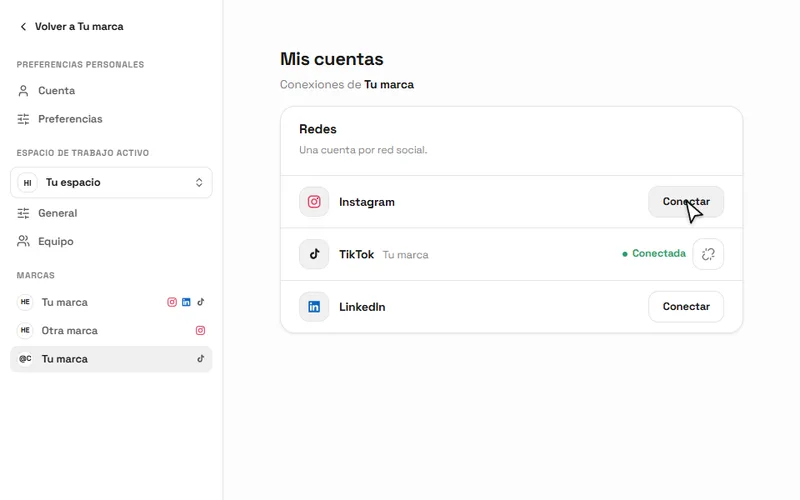
In your brand, open My accounts and connect Instagram. HeyMark pulls in what you’ve already published and lays it out on the calendar.
My accounts in HeyMark: you connect Instagram once and schedule from the calendar. - Create the Reel
Upload the video from your computer, trim it if needed and write the caption with Instagram’s limits in view.
- Pick its options
The cover, whether it shows in the feed, collaborators, the first comment or Trial Reel mode.
- Schedule it
Choose the date, time and time zone. If it’s also going to TikTok, duplicate it first without re-uploading the video.
After publishing, if the Reel looks blurry or loses quality after upload, follow what to check when an Instagram Reel looks blurry.
Frequently asked questions
Can you schedule Reels on Instagram?
Yes. From the app, with a public account, up to 25 posts a day and up to 30 days in advance. From HeyMark, also with options the app won't schedule, like collaborators.
Can you schedule Trial Reels?
Yes. In HeyMark you pick manual or performance-based mode and schedule it like any Reel. As of September 2026, Metricool and Later also schedule them; Buffer's Help Center says it doesn't.
Can you schedule a collab post on Instagram?
Not from the Instagram app: its Help Center says collaborative posts aren't compatible with scheduled content. In HeyMark you can, with up to 3 collaborators, who have to accept the invite in Instagram.
Can you schedule the first comment?
Yes. In HeyMark the first comment is scheduled together with the Reel, so you don't have to type it by hand once the post goes live.
Why can't I schedule Trial Reels?
Check Instagram's eligibility first: as of September 2026, a public account with at least 200 followers if it's professional or 1,000 if it's personal, and an account that can appear in recommendations. Then check your tool: Buffer, for example, doesn't support Trial Reels.
Can I schedule Reels from my computer?
Yes. HeyMark runs in the browser: you connect Instagram, upload the video from your computer and schedule it with its options. You can also schedule from Claude or ChatGPT connected over MCP.
See it on your own accounts.
Connect Instagram, TikTok, Facebook, LinkedIn or YouTube and use HeyMark free for 7 days. Mark answers in your voice, and you approve what goes out.
Keep reading
- How to schedule social media posts across multiple platformsUpload once in HeyMark, prepare a linked post for each network, then schedule them together. Check each format, setting and time before confirming.
- Cross-post Instagram Reels to TikTok without uploading twiceCross-post Instagram Reels to TikTok without uploading twice: duplicate the Reel, set TikTok's own options and keep the Instagram watermark off your video.
- Instagram MCP server: run your account from Claude or ChatGPTAn Instagram MCP server for Claude and ChatGPT: schedule Reels and carousels, reply to comments and DMs after you approve, and build comment-to-DM automations.
- Instagram DM automationInstagram DM automation for comments: anyone who comments your keyword gets a public reply and a DM with your link. On every HeyMark plan, no credits spent.