Use Claude Cowork as a social media manager, with scheduled routines
Add HeyMark as a custom connector and Claude Cowork can read your metrics, calendar and inbox, leave drafts and schedule posts on Instagram, TikTok, LinkedIn, Facebook and YouTube. Cowork's scheduled tasks run in the cloud even when your computer is off. Anything HeyMark asks you to approve (publishing now, replying, hiding or deleting comments, changing automations) waits for a person.
By HeyMark · Reviewed by Crescente Martinez, CMO and co-founder of HeyMark · Updated
Monday, 8 a.m. Before you open your laptop, Claude has already checked how your brand did last week, compared it with the week before and left three drafts on the calendar for the empty days. That’s Claude Cowork as a social media manager with HeyMark: a scheduled task that works on your real Instagram, TikTok, LinkedIn, Facebook and YouTube accounts, and stops wherever a person needs to decide.
Cowork is Claude’s mode for multi-step work. Per Anthropic’s help center, it uses the same agentic architecture as Claude Code, with no terminal, and it’s on paid plans. HeyMark plugs in as a custom connector: one URL, https://mcp.heymark.ai, and your sign-in. There are no keys to generate, Claude sees what your account sees, and access costs nothing extra on any HeyMark plan.
On September 16, 2026, Anthropic announced that Cowork and chat are merging into one Claude, rolling out gradually and to Pro and Max first; Team and Enterprise keep the two separate for now. If your message box no longer shows Chat and Cowork, you have the new experience: scheduled tasks and connectors are still there.
What Claude Cowork does for your social media with HeyMark
With the connector, Claude reads your metrics, your calendar, your comment and message inbox, and your automations. It also writes: drafts, scheduled posts, replies and automations. In a scheduled task, what matters is which of those move forward with nobody watching:
| What you ask for | In a task that runs on its own |
|---|---|
| Reading metrics, the calendar, the inbox and automations | Goes ahead. Reading changes nothing on your accounts |
| Creating or editing drafts | Goes ahead. A draft doesn’t go out to any network |
| Scheduling | Runs right away, with no preview, and the post goes out at its time |
| Publishing now, replying, hiding or deleting comments, changing automations | Waits for a person: HeyMark returns a preview someone has to approve |
All of that assumes Claude may use those tools without asking you: the steps below show how.
Two routines to start with
Anthropic recommends starting with low-risk tasks like summaries, and not scheduling tasks that send messages on your behalf (Use Claude Cowork safely). These two follow that rule: they read, sort and leave drafts. What goes out on your accounts is still your call.
Every Monday: last week’s numbers and drafts for the empty days
Weekly, first thing. The drafts carry a planning date: that places them on HeyMark’s calendar, but it doesn’t schedule them.
Monday routine
Use HeyMark with the brand brand name. 1. Compare the last 7 days with the 7 before on each connected network: followers, views, interactions and the 3 posts with the most interactions. 2. Find the days this week with nothing planned on the calendar. 3. For those days, create 3 drafts based on what worked, each with a network, format, idea, caption in the brand's voice and a planning date. 4. Summarize the numbers per network, what worked and why, and the drafts you left. Don't schedule, publish or reply to anything. If a number is missing, say so instead of estimating it.
Every morning: the inbox, summarized
On weekdays. Claude drafts replies but sends none of them. If a draft works, ask Claude to send it in that same session: that’s when you’re there to approve the preview.
Morning routine
Use HeyMark with the brand brand name and go through the inbox.
1. Tell me how many conversations are unread and which ones Mark escalated to a person.
2. Group the questions that keep coming up.
3. For every conversation waiting on a reply, draft a response in the brand's voice without sending it.
4. Sort everything by urgency: complaints and purchase questions first.
Don't reply, don't hide or delete comments, don't mark anything as read and don't change any automation.What happens when nobody’s watching
There are two brakes: one in Claude and one in HeyMark.
Claude’s. In Manually approve mode, Claude pauses and asks before it uses a connector tool set to Needs approval; tools set to Always allow go ahead (Get started with Claude Cowork). Automatically approve asks less, and Skip all approvals doesn’t ask. On Team and Enterprise, the option to always allow a connector’s write tools is off by default: until an owner turns it on, every task asks for approval to use them, and the Monday routine would stop at the drafts (Cowork on Team and Enterprise).
HeyMark’s. Publishing now, replying on the platform, hiding or deleting comments and changing automations stop at a preview a person has to approve, and that approval expires after five minutes (the technical detail is in Publish from a coding agent). In a task that runs on its own, those actions wait for you: when you open the result, you ask for a fresh preview and approve it. Scheduling has no such brake. That’s why both routines leave drafts, don’t schedule, and say so in the prompt.
If what you want is someone answering comments and messages around the clock, that isn’t a job for a scheduled task. Inside HeyMark, Mark’s AI replies and keyword automations do it, and the automations use no credits.
How to set it up
- Check what you need
A paid Claude plan (Pro, Max, Team or Enterprise) and a HeyMark account with your networks connected under My accounts. HeyMark has a 7-day trial.
- Add HeyMark as a custom connector
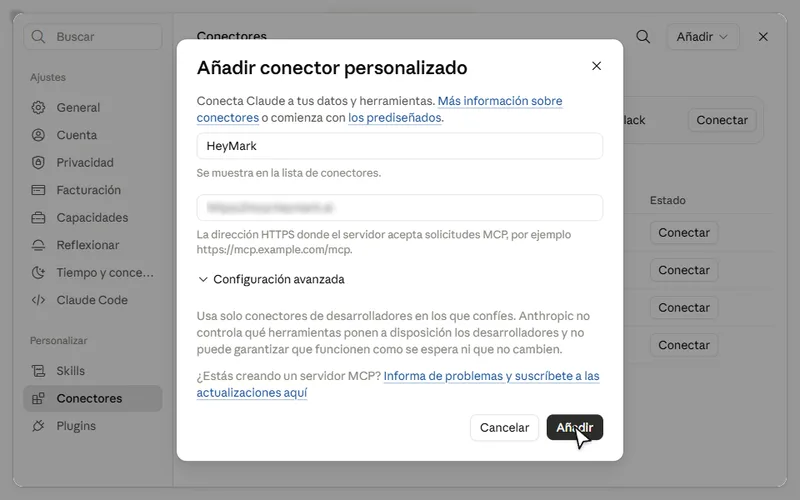
In Claude, go to Customize > Connectors, select + and choose Add custom connector. Enter HeyMark as the name, paste
https://mcp.heymark.aiand select Add. Then select Connect and sign in to HeyMark to approve access. On Team and Enterprise, an owner adds it first under Organization settings > Connectors.HeyMark as the name and the MCP server URL in Claude's form. - Decide what it can do without asking
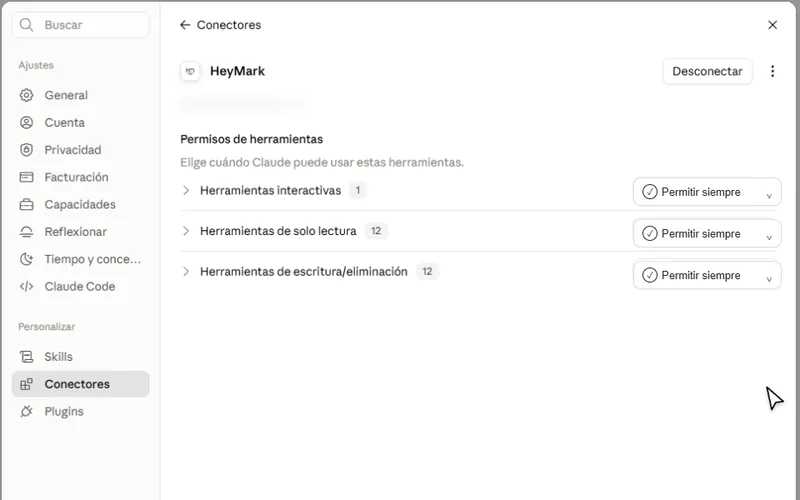
Under Customize > Connectors > HeyMark, the tools start at Needs approval. Switch the read tools to Always allow, for the numbers and the inbox, and the write tools only if the routine leaves drafts. Anthropic says to use Always allow only with servers you trust to run unsupervised (custom connectors).
HeyMark's permissions in Claude, by tool category. - Run the routine by hand
Paste the prompt into a Cowork task and check that it brings back real numbers from your account and leaves the drafts on your HeyMark calendar.
- Schedule it
In the sidebar, open Scheduled, select New task and choose Set up manually. Add a name, paste the prompt, pick the approval mode and the frequency (weekly for the Monday one, on weekdays for the inbox) and select Save. You can also type /schedule inside a task. In the new Claude experience, ask for it in the conversation and confirm with Schedule (Anthropic’s steps).
- Review every run
For the first few weeks, open Scheduled and read each result, as Anthropic recommends. That’s also where you pause or delete a routine.
When another option fits better
- If you don’t have a paid Claude plan. Cowork isn’t on the Free plan. There you can add a single custom connector and use HeyMark in chat: Claude with HeyMark.
- If your work starts from files on your computer. Per Anthropic, a scheduled task works with your connectors and the files saved to your Claude account, not with a folder on your computer. Claude Code or Codex upload those files to HeyMark from the terminal.
- If you need other networks. HeyMark publishes to Instagram, TikTok, LinkedIn, Facebook and YouTube. It doesn’t publish to X, Pinterest, Threads, Bluesky or Google Business Profile.
The Claude Cowork details on this page come from Anthropic’s official help center, verified on September 25, 2026.
Frequently asked questions
Can Claude Cowork post on social media?
Yes, through a connector that publishes, like HeyMark's. It creates the post, schedules it and publishes it on Instagram, TikTok, LinkedIn, Facebook or YouTube; publishing right away goes through a preview you approve first.
Is Claude Cowork free?
No. Cowork and its scheduled tasks are on Claude's paid plans: Pro, Max, Team and Enterprise. HeyMark's connector costs nothing extra on any HeyMark plan, which starts at $12 USD a month after a 7-day trial.
Can Cowork run social media tasks on a schedule?
Yes. A task can run hourly, daily, weekly or on weekdays, and Anthropic says scheduled tasks run in the cloud even when your computer is off, unless they need local files or apps. HeyMark's connector is remote, so Claude reaches it from Anthropic's cloud.
Claude Cowork or Claude Code for social media?
Cowork uses the same agent architecture as Claude Code, without a terminal, and suits routines and scheduled tasks. Claude Code suits work that starts from files on your computer, because it uploads them to HeyMark from the terminal.
Can Cowork reply to comments without my approval?
Not through HeyMark: every reply on the platform goes through a preview a person approves. For replies when nobody's watching, HeyMark has keyword automations and Mark's AI replies, which run inside HeyMark.
Does Claude Cowork work on Windows?
Yes. Anthropic offers Cowork in Claude Desktop for macOS and Windows on every paid plan (Windows needs the latest version), plus on the web and mobile for Pro, Max and Team. HeyMark runs in the browser.
See it on your own accounts.
Connect Instagram, TikTok, Facebook, LinkedIn or YouTube and use HeyMark free for 7 days. Mark answers in your voice, and you approve what goes out.
Keep reading
- HeyMark in ClaudeConnect Instagram to Claude with HeyMark's custom connector: analyze your posts, plan the month, schedule, and reply to comments and DMs with your approval.
- Claude Code and CodexConnect Claude Code or Codex to HeyMark's MCP server with one command: upload local files, schedule campaigns with your approval, write reports to markdown.
- AI agent for social mediaWhat an AI agent for social media does and how it differs from an assistant: it plans, writes in your voice, publishes, replies and reports, with your approval.
- Unified social inboxA unified social media inbox for the comments and DMs on your accounts, with AI replies in your voice, handoff to people and access from Claude or ChatGPT.
- Instagram MCP server: run your account from Claude or ChatGPTAn Instagram MCP server for Claude and ChatGPT: schedule Reels and carousels, reply to comments and DMs after you approve, and build comment-to-DM automations.